I’ve previously written about using AI coding tools to build various side projects. Now I want to take a broader look at the ecosystem surrounding the models, starting with Model Context Protocol. MCP is an open standard for connecting AI systems to external tools. The official docs describe it as USB-C for AI: one protocol to connect any model with any tool.
We’ll cover each component of MCP, but focus on building an MCP server. This is the most important bit for application or API developers. As a worked example, I created gtfs-mcp, which gives LLMs access to realtime public transit data. You can find the source code on GitHub.
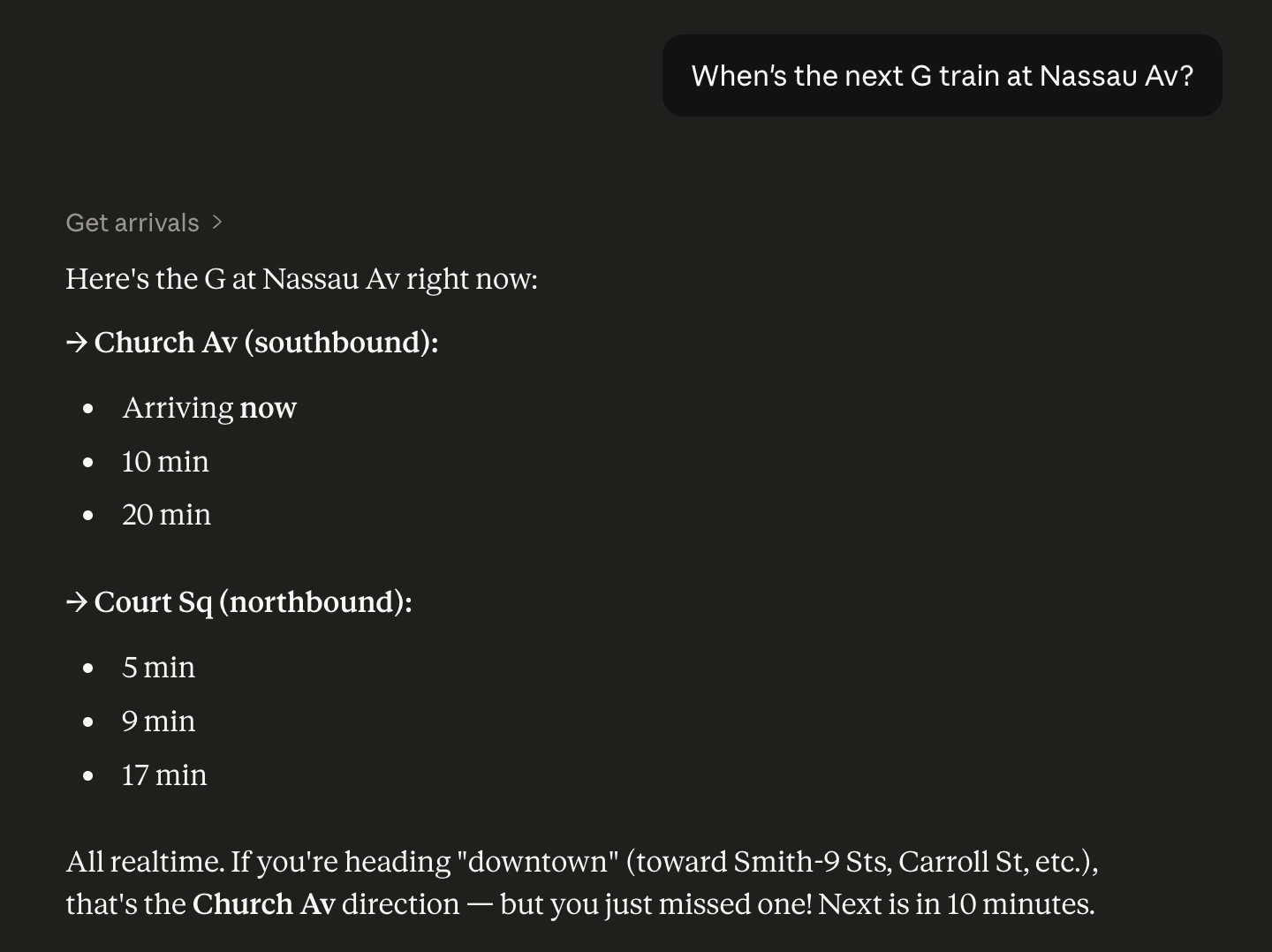
The project comes pre-configured for the NYC Subway, since those transit feeds are published freely in GTFS format without any API key setup. The screenshot above shows the tool in action within Claude Desktop.
What is MCP?
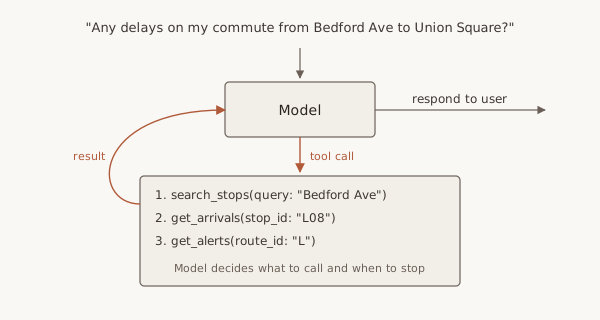
Before we get too deep into MCP, we need to talk about agents. An agent is essentially just an LLM with a couple of special properties:
- access to tools
- a harness that enables the model to loop until a task is achieved
Claude and ChatGPT are both agentic these days. They have built-in tools that allow them to perform actions like web search, and they can chain several tool calls together before answering the user. They also support MCP, allowing third party developers to provide additional tools.
Our transit data MCP server has 11 tools in total. We can ask “Any delays on my commute from Bedford Ave to Union Square?” and the model will loop through several different tool calls to formulate an answer.
So it’s just an API?
A couple of things differentiate MCP servers from good old REST APIs. The most important one is that MCPs are self-describing. Any client can talk to any server because the MCP spec standardises how an agent discovers tools and calls them via JSON-RPC. Put simply, an MCP server advertises the services it offers. This can be a combination of three primitives: tools, resources, and prompts.
| Primitive | Called by | Surfaced as | Example |
|---|---|---|---|
| Tool | model | function call | get_arrivals |
| Resource | host | data pulled into context | gtfs://systems |
| Prompt | user | slash command | /transit-status |
The host is the user’s AI app, like Claude or ChatGPT. My Claude Desktop app can be connected to many MCP servers at once (it calls them ‘Connectors’), holding one MCP client internally for each active server. In one chat I can query transit status from my local MCP server; in another I can add an event to my Google Calendar.
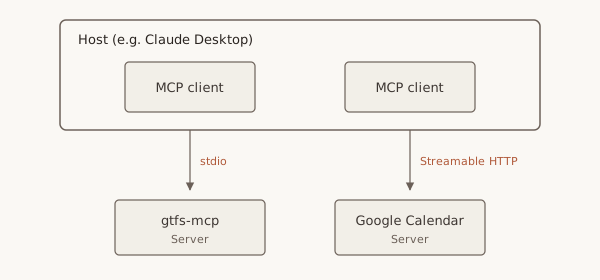
MCP connections are stateful and long-lived. The host maintains connections, rather than running a REST-style request/response cycle. This unlocks advanced features like sampling, where an MCP server can ask the host to make an LLM call on its behalf, e.g. to summarise data before returning it to the user.
The transit use case
LLMs have vast knowledge embedded from their training data. When I ask Claude a question like “When’s the next G train at Nassau Av?”, it can easily infer that I’m asking about NYC transit status, but the only tool it has to answer that question by default is a web search. Here’s that same prompt we saw earlier without gtfs-mcp connected.
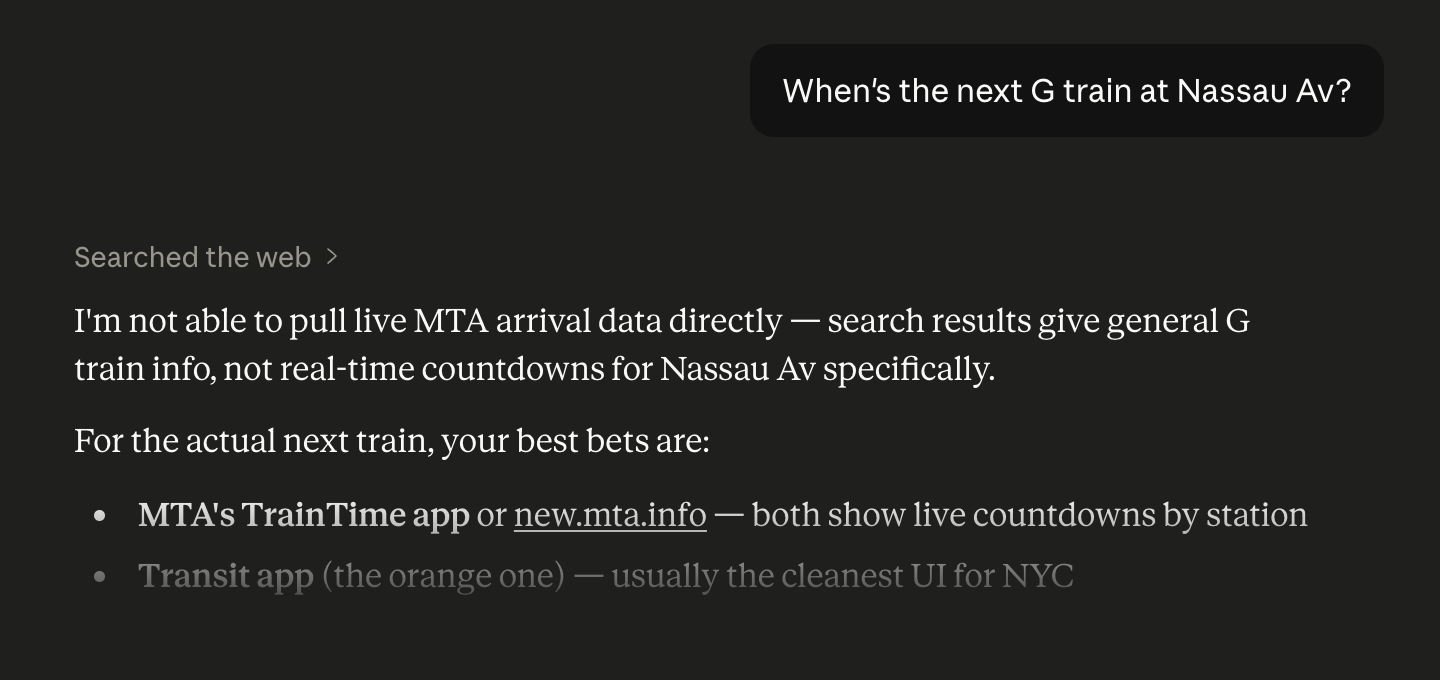
This prompt didn’t produce reliably good results for NYC, even with dozens of websites publishing realtime Subway status. There’s little hope for a query about public transit in Saskatoon without a more structured approach. gtfs-mcp can be configured with any set of transit systems publishing realtime data feeds in the GTFS standard. With the MCP server connected, we get predictably correct answers.
Wiring it up
Tools are the most interesting primitive, since it’s the model (not the user) that picks and parameterises them. Tool definitions have four parts:
- Name: a stable identifier the model uses to call the tool
- Description: natural language instructions for the model covering when to use the tool and what it provides
- Input schema: typed parameters with short descriptions, which the model populates from the user’s question
- Handler: code that runs when the tool is invoked, usually hitting a database or calling an API
Tools can also declare annotations like readOnlyHint so the host knows what’s safe to execute automatically and what to confirm with the user.
gtfs-mcp has 11 tools written in TypeScript, defined as above and grouped into files like stops.ts, routes.ts, and arrivals.ts. The server registers the tools and connects to a transport. This is the channel it uses to speak to the client. Stdio is the default for local servers: the client spawns the server as a subprocess and they exchange JSON-RPC messages over stdin and stdout. There’s also a Streamable HTTP transport for hosting the server on a separate machine from the user’s AI app.
I used the official @modelcontextprotocol/sdk package to handle tool registration and transport.
Running it
Adding a local MCP server in Claude Desktop is simple. It discovers MCP servers via a config file. Each entry is a command to run with arguments and environment variables.
{
  "mcpServers": {
    "gtfs": {
      "command": "node",
      "args": ["/absolute/path/to/gtfs-mcp/dist/index.js"],
      "env": { "GTFS_MCP_CONFIG": "..." }
    }
  }
}
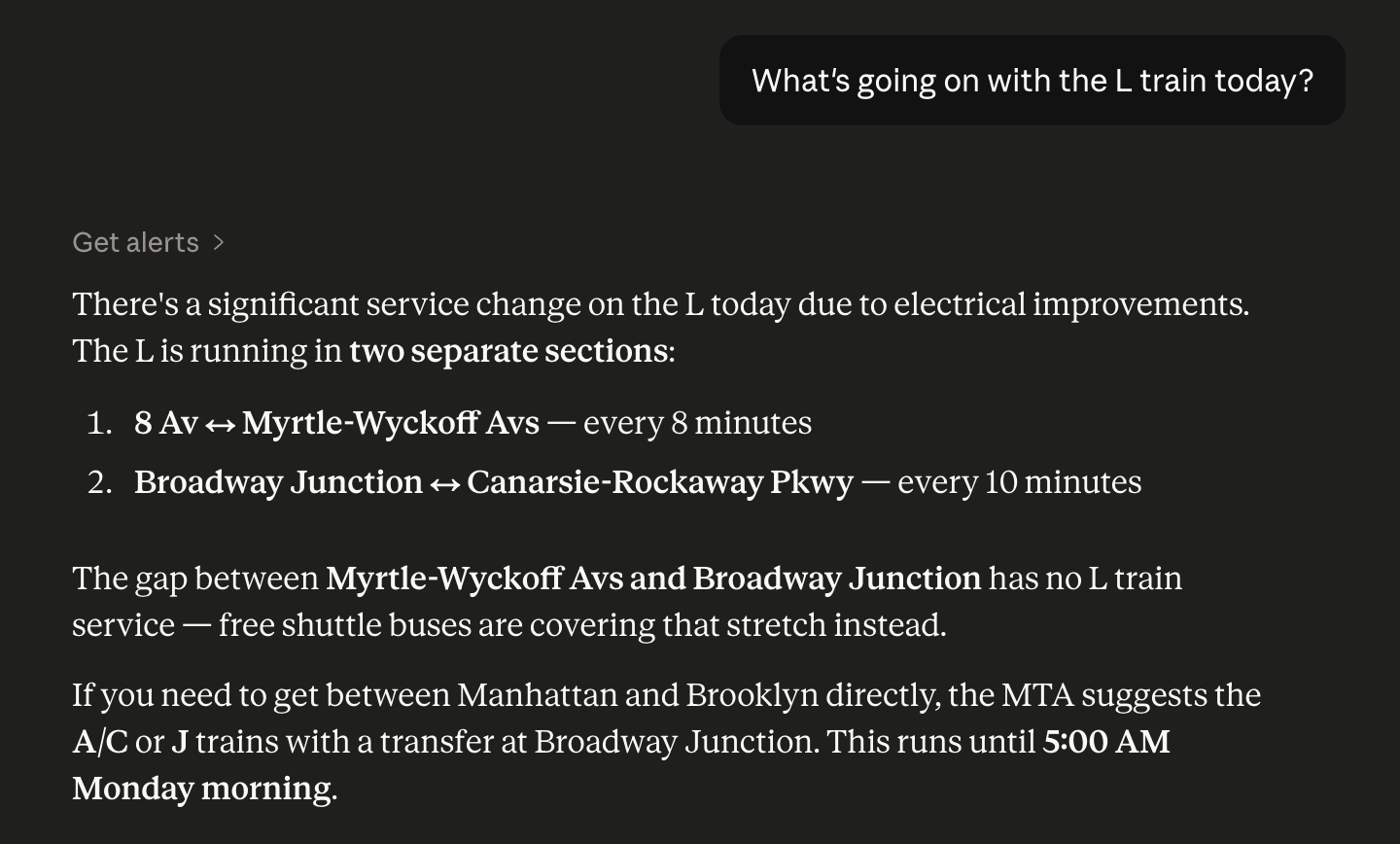
On startup, Claude Desktop spawns each configured server and asks for its tools. Tool descriptions appear in the context window and the model starts reasoning about when to use them. If the user asks a question like “What’s going on with the L train today?”, the model uses this context to call get_alerts with route_id: "L".
Designing for models
Tool definitions are the most important thing to get right. Models will choose if, when, and how to use tools almost entirely based on this text. This is more like prompt engineering than writing developer docs. I’ve distilled a few principles from trial and error.
Provide answers, not just data
The first version of get_arrivals echoed the GTFS API shape, listing a series of train times. The model was smart enough to split them by direction, but the user typically needs to know the destination too. We can’t control exactly how the question is answered, but deriving the destination in the handler and returning it guides the model’s response.
How much to try and steer answers is nuanced. I wanted the tools to be generic so they’d be equally useful for a one-off user question or complex analysis (e.g. measuring delays). I came up with a list of canonical user queries, ensuring there were just enough fields on tool responses to satisfy those use cases.
Use the model’s knowledge
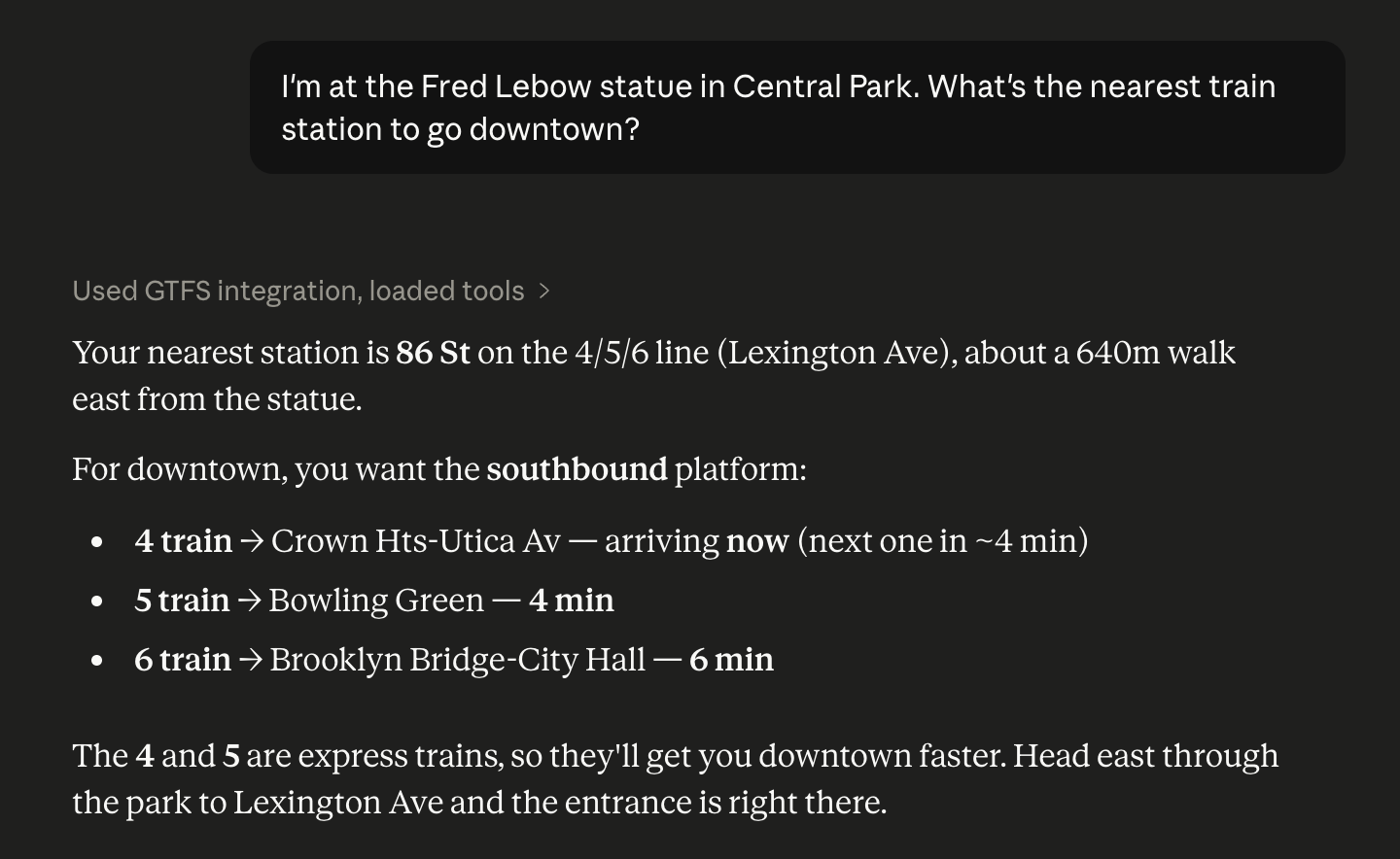
The find_nearby_stops tool was the most interesting one to test. It turns out that very large models have rough coordinates of landmarks embedded from their training data. The tool can therefore just accept lat/lon parameters, staying focused on transit data and avoiding the complexity of geocoding entirely.
{
  "lat": 40.7794,
  "lon": -73.9632,
  "system": "mta-subway",
  "radius_m": 800
}
Even if the host is not location-aware (i.e. the model doesn’t have access to a tool that provides the user’s location), the user can just reference a place in their query.
Give firm instructions
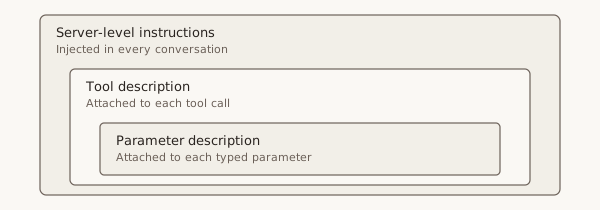
The downside of that flexibility is that models try to take shortcuts and guess parameters. The server provides tools to look up systems and stops, but I found that models would still guess IDs (or invent them for fictional stops). Three layers of guidance corrected this behaviour:
- Server-level instructions: the host injects this string in every conversation and it says “resolve IDs via the discovery tools, don’t guess them”
- Tool descriptions reference other tools:
get_stoptells the model to callsearch_stopsfirst when it only knows the stop name - Parameter descriptions provide sources for IDs:
stop_idis documented as coming fromsearch_stops,find_nearby_stops, orget_route
Each of these steps is trivial in isolation, but together they eliminate most guessing and steer the model to use the tools as intended.
Make errors directive
Models treat tool errors as part of the conversation, not terminal failures. A 400 with invalid stop_id has no useful information, but a 400 with stop_id 'L01' not found — use search_stops to find IDs tells the model what to do differently. Error responses are an opportunity to redirect the model towards a correct workflow.
Testing
MCP Inspector provides a UI to connect to servers, list tools, and call them manually. This is useful for sanity-checking the schema and JSON exposed to the model during development.
Evals were the new thing for me. We need to verify that models will select the correct tool for a given query. This is essentially testing that the instructions, descriptions, and parameters we’ve defined survive contact with the non-deterministic world of the models calling our server.
I used promptfoo to run a set of prompts through an MCP-enabled model and assert on its tool choice. This is how I caught and fixed the ID guessing behaviour covered above. It’s also a good way to check a tool will be used correctly by a wide variety of models from different providers.
MCP vs. CLI
If you’ve used AI coding tools like Codex or Claude Code, you’ve probably noticed they’re extremely good at using command line tools like grep, curl, and git. So where does MCP fit in if you could just build a CLI?
- Consumer clients: Coding agents like Claude Code have shell access, so a CLI may be a simpler solution for developer tools. MCP gives consumer clients like Claude Desktop, ChatGPT, and mobile apps access to tools too.
- Capability discovery: You have to document your interface somewhere, and MCP provides a standard way to do that, without relying on embedded knowledge or separate API docs.
- Brokered auth: An MCP client sits between the user and the server. For something like a calendar MCP, the user grants access and the model never holds the credentials.
Conclusion
LLMs are great at using structured data to answer complex questions, but there are many things they can’t do well out of the box, either because they don’t have the right data or because their actions are limited to text output. MCP servers enhance model capabilities by providing specialised data sets and tools.
Building a public transit MCP was a fun experiment because the data is naturally realtime. Frontier models can already give you decent directions and trip plans from their training data. gtfs-mcp extends that capability with realtime data the models could never know, allowing them to check for service alterations and provide precise timings.